Free Looker Studio template: Analyze your Google Ads audience data
By Brad | 1 comment October 15, 2019
Categories
Analyzing your audience data in Google Ads can be difficult, especially as it crosses over campaigns and ad groups. That’s why we’ve created a free Google Looker Studio report that makes it easier to visualize your data.
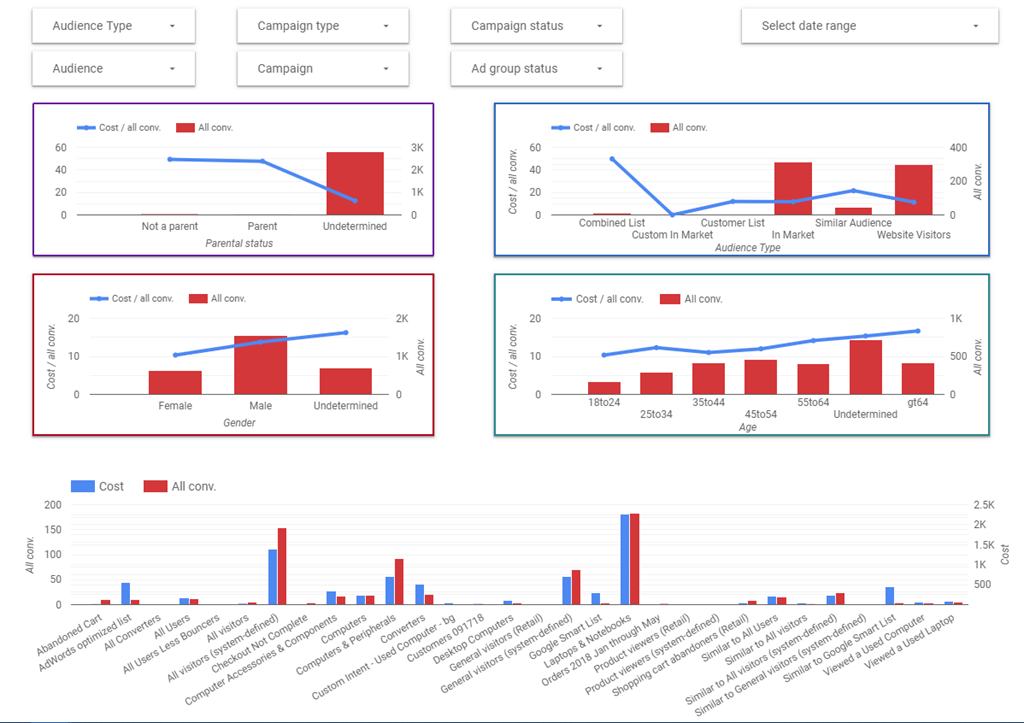
The report consists of eight pages:
- Audience overview
- All audience details — graph
- Look for high spends with few conversions. You want to pause or change bid adjustments for these audiences.
- All audiences — chart
- Get audience detail if you like charts or download the data and work in Excel
- Audience drill-down
- My favorite report. Start with an audience type overview, then drill down into any segments.
- If you’ve not worked with drill-downs before, watch the above video
- Age — data by age ranges
- Gender — data by gender
- Parental status — data by parental status
- Resources — links and other info you need to work with Looker Studio
Drill-down
The audience drill-down page starts by looking at audience types. You can then drill down into the audience name, campaign, and ad group data.
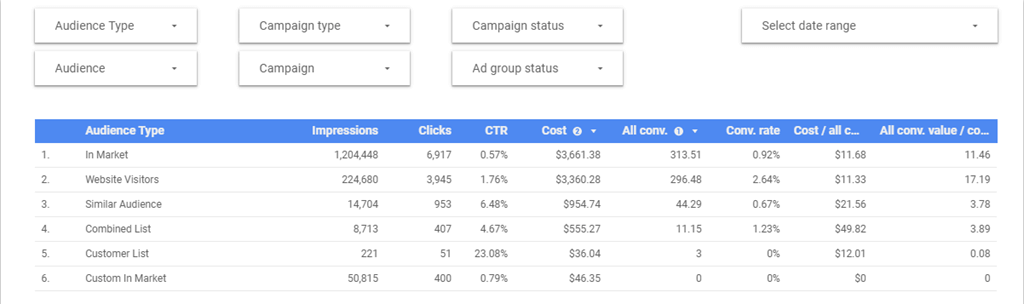
Where drill-downs are confusing is that you can look at all the data, or just selected types. As an audience can be at a campaign or ad group level, that sometimes creates a ‘null’ piece of data. This This concise video walks you through the process.
How to get the report
You can download this report, as well as several others from our Google Looker Studio reports page.
If you need help getting started with Looker Studio, this playlist should help you out:
Share around the web









Improve performance
with
actionable
analysis



Gd bless you Brad for sharing these templates and articles on how to use them properly.
Leave a comment