Managing low-volume keywords in Alpha/Beta or Managed/Discovery
By Brad | 0 comments April 12, 2016
Categories
The workflow often known as Alpha/Beta or Managed/Discovery works like this:
- Discovery campaign (beta): Use modified broad match keywords
- When a search query consistently receives conversions, make it a negative exact match in the search campaign and add it as an exact match keyword in the managed (alpha) campaign
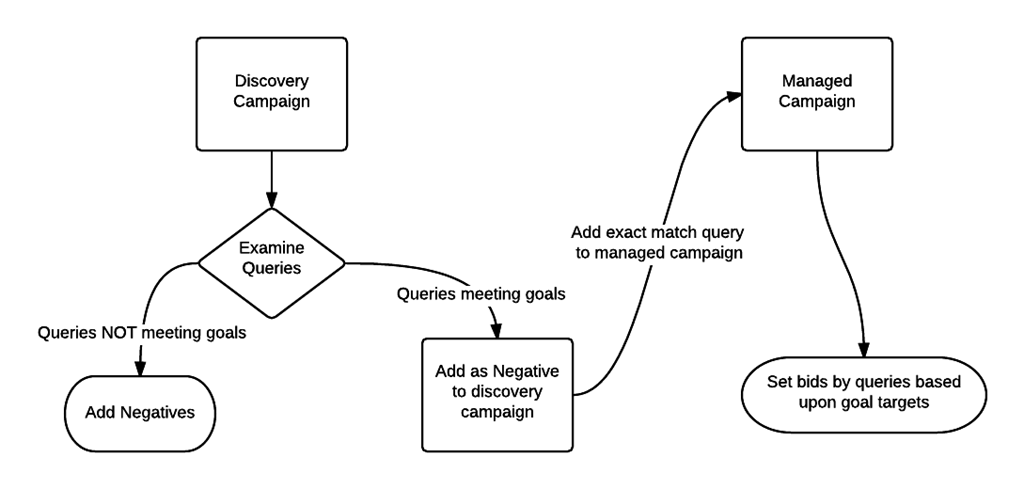
This structure forces your top words into highly managed campaigns with high budgets. It allows you to keep other words you want to show for, but which aren’t your top keywords, with a lower budget in your discovery campaign.
This structure works well for small to mid-sized accounts. It often starts to get difficult to manage for enterprise accounts with potentially millions of keywords.
However, we find that this workflow often causes one major problem: you stop showing for some queries due to low volume.
Low-volume keywords
If a keyword doesn’t consistently receive roughly 35 impressions a month, it is marked as ‘low volume’ and that word won’t trigger any ads.
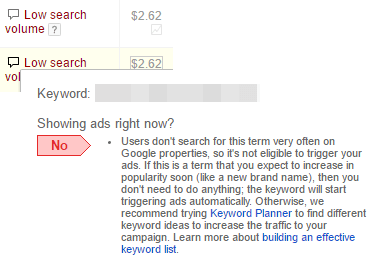
The problem with this structure is that you can’t show an ad for a low volume query from any campaign:
- Discovery campaign: negative exact match: keyword doesn’t show
- Managed campaign: low search volume: keyword doesn’t show
Fixing the low volume problem in Managed/Discovery campaigns
The problem isn’t in the overall workflow of managed/discovery. What we find is that the problem is in the definition of ‘queries meeting goals’.
We’ve changed our definition to be: A query should be added to a managed campaign is if has at least 35 impressions and 2 conversions per month for 3 consecutive months.
By defining this simple step, yet very important step, we’ve managed to overcome the low volume problems in dealing with this account structure.
Share around the web









Scale your PPC performance,
not your workload.


Leave a comment