Categories
Even good Google Ads accounts drift over time.
Budgets move. Bid strategies change. New campaigns launch. Old keywords stop working. Search terms shift. Landing pages get updated. A setting that made sense six months ago may not make sense today.
A good audit helps you understand what’s working, what’s holding you back, and what should be fixed first.
In this guide, we’ll walk you through a practical process for reviewing a Google Ads account and turning the findings into clear next steps.
Why audit a Google Ads account?
Most audits start with one of four questions.
- Has something gone wrong? Maybe conversions are down, CPA is up, ROAS has dropped, or spend has increased without a matching lift in results.
- Is the account following good PPC practices? Even stable accounts can hide wasted spend, outdated settings, or missed opportunities.
- Can the account do more? This could mean more conversions, lower costs, or better quality traffic.
- What would an agency change? During a sales process or handover, an audit needs to show more than problems and focus on improvements.
Before you start, be clear on the purpose of the audit. A pitch audit, a quarterly health check, and a deep performance review shouldn’t all look the same.
Start with the business goals. Before starting your audit, ask a few basic questions:
- What is the account trying to achieve?
- Which conversions matter most?
- Are there different goals for different campaigns?
Without this context, it is easy to prioritize the wrong fixes.
For example, a campaign with a high CPA may still be valuable if it drives better-qualified leads. A campaign with a low CPA may be less useful if those leads rarely become customers.
Account overview
Review the account scope
Start with a quick overview of the account:
- Number of campaigns
- Monthly spend
- Campaign types
- Target markets
- Bid strategies
- Who manages the account
This gives you context for the rest of the audit.
A small account with three campaigns needs a different approach from one with 50 campaigns across several countries. A low-volume lead generation account is different from a high-volume ecommerce account.
The team matters too. If it’s an experienced PPC team, focus on strategic gaps and performance opportunities. For a small team with limited PPC experience, you may need to check more of the basics. When most of the changes are done by API, scripts, or Google’s AI, it might mean no one’s looking at the data.
Check whether you trust the conversion data
If the conversion data is wrong, every performance decision becomes unreliable. Bid strategies, budgets, reports, and optimization decisions all depend on the data being accurate enough to use.
Start by asking: do we trust the conversion data? Then review:
- Which conversion actions are being tracked
- Are any important conversions missing?
- Are any conversions counted twice?
- Do the primary conversions match the business goals?
- Do some campaigns use different conversion goals from the account default?
- Are phone calls, downloads, and mailto links tracked where relevant?
For lead generation, check the conversion count setting carefully. If the same person submits a form several times, you may not want each submission counted as a separate lead. For ecommerce, counting every purchase usually makes more sense.
Also check which goals are listed in the account-level goals. These are the conversions used by automated bid strategies. Some actions are useful for analysis, but shouldn’t necessarily guide the bidding algorithms.
Missing data can make performance look worse than it really is. It can also limit automated bidding, because Google has less information to learn from.
That doesn’t mean every possible action should become a primary conversion. The key is to learn which signals belong in reporting or bidding, and which are only useful context.
Audit campaign settings for consistency
Different campaigns often need different settings. But unexpected differences can reveal mistakes.
Compare settings such as:
- Location targeting
- Networks
- Ad schedule
- Devices
- Bid strategy
An audit should flag any differences and ask whether they are deliberate.
Pay close attention to Search and Display settings. Search campaigns and Display campaigns usually reflect different intent. Combining them can make performance harder to understand and harder to optimize.
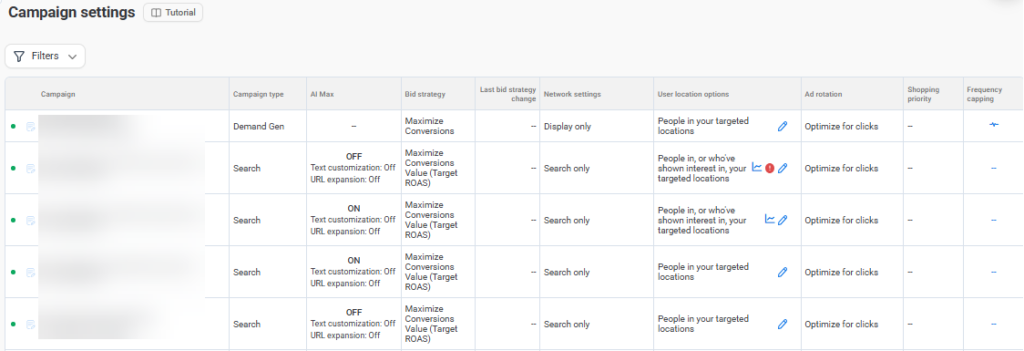
Adalysis campaign settings summary: scan it for inconsistencies or rely on your alerts.
Assess ad group organization
The basic principles of ad group organization haven’t changed since Google Ads launched. The ads in an ad group should make sense for the keywords and search terms in that ad group. Look at:
- Ad groups with too many unrelated keywords
- Top-spend ad groups with weak performance
- Ad groups with no active ads
- Ad groups with no active keywords
- Ad groups where ads don’t match the keywords
- Ad groups where the landing page doesn’t match the keyword intent
- Ad groups where the landing page doesn’t contain the offers mentioned in the ad
The question is simple: can one set of ads speak clearly to all the search terms in this ad group? If not, the ad group may need to be split, rewritten, or matched to a better landing page.
Start with the highest-spend ad groups. This is where poor structure usually has the biggest impact.
Review RSAs and pinning
RSA testing needs data density. If you have an ad with 15 headlines and two descriptions, that’s over 50,000 possible combinations. Depending on volume, it could take years for Google to determine which assets work best together.
Pinning reduces combinations, so learning speeds up. Start by looking at the overall asset set:
- Consistency and level of pinning
- Asset performance breakdown
- Repeated assets across ads
- Headlines that don’t match the search intent
- Disapproved ads or assets
Assess whether the ads match the keywords, support the landing page, and give the account enough clear message variations to test.
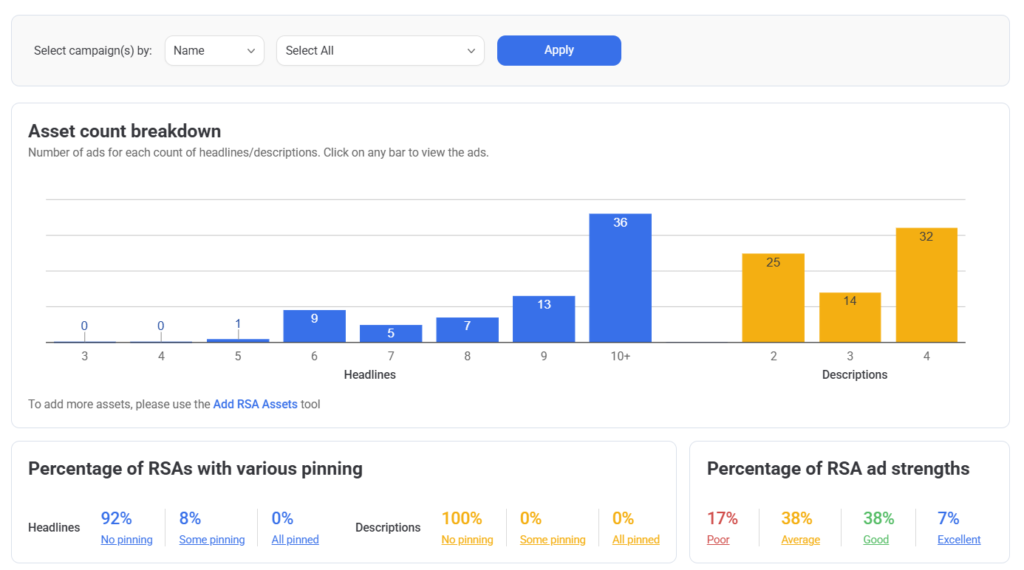
Adalysis RSA asset insights: get an overview of asset counts, pinning, and ad strengths.
Check for auto-created assets
There are several settings in Google Ads that can create assets on your behalf. These are generally created in Search or PMax campaigns. Review any auto-created assets to ensure they’re accurately describing your business and offers.
Performance overview
You often won’t have time to look at every detail. Instead, look into problem areas. Start with an overview.
Analyze performance trends
Don’t rely only on the last 30 days.
Short date ranges can hide the real trend, especially in seasonal accounts. A month-over-month drop may look serious until you compare the same period year over year.
Review performance across a few views:
- Last 30 days
- Last 90 days
- Year over year
- Before and after major changes
Then ask what changed.
Performance shifts can come from changes in search volume, impression share, landing pages, bid strategies, keyword status, conversion tracking, or budget allocation.
A good Google Ads audit doesn’t just say performance is up or down. It helps explain why performance changed.
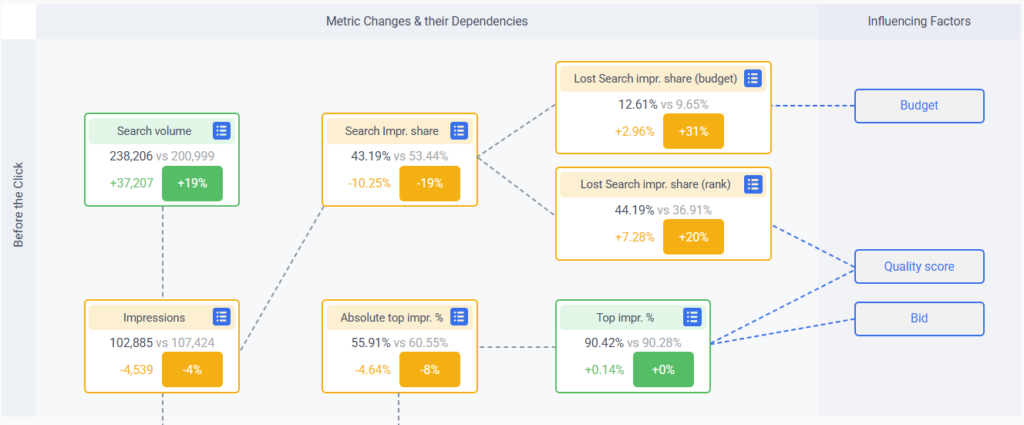
Adalysis Performance Analyzer extract: visualize performance shifts for faster analysis.
Review impression share
Impression share shows whether campaigns are limited by budget, rank, or available demand. This analysis will also help you prioritize actions. For example:
Strong performance, limited by budget: consider moving budget from weaker campaigns.
Strong performance, limited by rank: review bidding and quality score.
Weak performance, limited by budget: understand the performance issue before increasing spend.
High impression share, poor results: review targeting, search terms, ads, and landing pages.
Moving budget around is often one of the easiest ways to gain more conversions. The account’s change history also helps to pinpoint changes that may have affected performance.
For issues with ad rank, dig into quality scores.
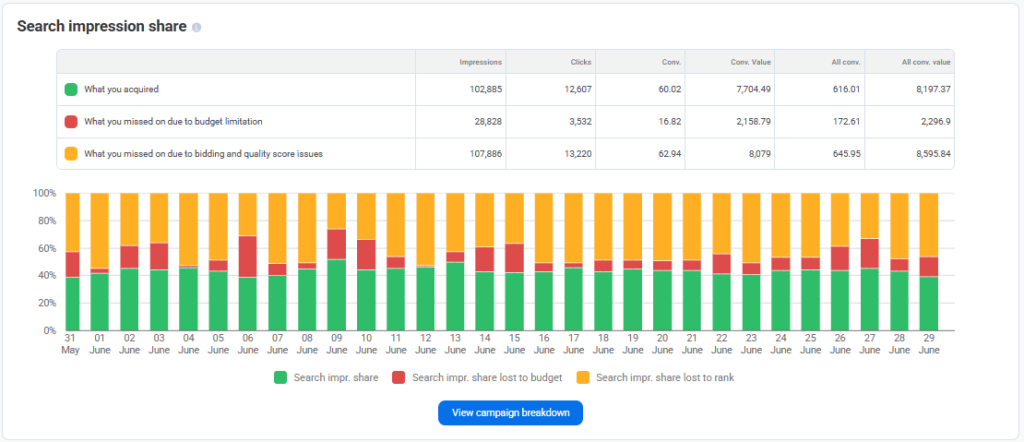
Adalysis search impression share breakdown: get insights faster, without prompting.
Evaluate keywords, search terms and negatives
Next, look at the account’s use of:
Keywords
- High-spend keywords with weak results
- Keywords with conversions but poor CPA or ROAS
- Conversion rates per match type
- Broad match keywords with no exact match coverage
- Duplicate keywords
- Disapproved keywords
Search terms
- Search terms triggering multiple ad groups
- High-volume search terms with no conversions
Negative keywords
- Missing negative keywords
- Negatives blocking active keywords
- Use of shared negative lists
Review match type performance alongside bid strategy. Broad match may work well in one campaign and poorly in another. Exact match may deliver stronger intent but less volume.
Assess Performance Max performance
PMax gives Google more control over targeting, bidding, creative, and where ads appear. This part of the audit needs a different approach from Search campaigns.
Start by asking three questions:
- Does the campaign have enough useful inputs? Missing assets can limit reach and reduce the number of combinations Google can test.
- Does it have the right controls? Audience signals guide Google’s automation toward relevant users.
- Is PMax taking impressions from Search? Review PMax search terms and evaluate overlap between campaign types. You may need exact match keywords, negatives, or brand exclusions to keep control.
Adalysis found that 67% of PMax campaigns have search terms that overlap with Search. When overlap existed, PMax generated more impressions than Search 61% of the time. Yet Search campaigns delivered higher CTRs 65% of the time and higher conversion rates 84% of the time. It’s important to control which campaign serves your ads.
Automation and guardrails
Auditing the machine is now a core part of Google Ads audits. But what does that mean?
The machine could be scripts, third-party tools like Adalysis or Google’s recommendations. Auditing the machine means understanding the criteria for an alert. And then deciding whether to automate, customize or ignore each one.
Campaign structure is one of the biggest guardrails. If campaigns are too broad, automation may have more data, but less control. If campaigns are too narrow, they may not have enough data to learn.
Ad group structure matters too. Keywords, ads, and landing pages should still work together. If the ad group is too mixed, automation has a weaker signal.
A third guardrail is targeting and bidding. If you’re running several campaigns, Google uses a hierarchy to decide which campaign to show. The winner usually comes from your exact match keywords or your most restrictive campaign eligible for the auction. That could be the one with the lowest budget, the smallest geography, and so on.
Human judgment especially matters where data is thin. Consider data density during your review of the account.
Audience analysis
Check whether audiences are being used for observation, targeting, exclusions, or remarketing. Many accounts collect audience data, but don’t use it. Establish whether certain groups convert better, or deserve different messaging.
Review:
- Remarketing audiences
- Customer match lists
- Custom segments
- In-market and affinity audiences
- Audience exclusions
- Audience performance by campaign
Competitor insights
Start with auction insights and look for changes in impression share and overlap rate.
Then, go a step further and look at how competitors are selling. Are they leading with discounts, price, speed, trust, or product features? Who stands out in terms of messaging?
These insights can help shape the next round of ad testing. They’re also especially useful in agency audits. Clients don’t just want a list of issues. They want insight into what could improve results.
Quality score and landing page relevance
Quality score can help diagnose relevance problems across keywords, ads, and landing pages.
However, a low score doesn’t always mean a keyword should be paused. A high score doesn’t always mean the keyword is profitable.
Instead, look at:
- Keywords with low quality score and high spend
- Keywords with poor ad relevance
- Keywords with poor landing page experience
- Keywords with weak expected CTR
- High-spend landing pages with poor conversion rates
- Landing pages that don’t match the promise in the ad
The landing page review should go beyond whether the page loads. Check whether the page matches the search intent and supports the ad message. It should give the visitor a clear next step.
If several keywords have poor ad relevance, the ad group may be too broad or the ads may need to be rewritten. If several keywords have poor landing page experience, the page may be slow, unclear, too generic, or mismatched to the search.
Aggregate quality score data at the ad group, campaign, and account levels. Combined with spend, this helps you pinpoint where you can have the biggest impact.
Prioritize and present the audit findings
Nothing is worse than a huge to-do list of little bits and pieces. The best Google Ads audits end with a point of view.
The findings should show performance blockers and what’s costing the account the most. Deciding which changes to prioritize means separating urgent fixes from strategic opportunities.
For client-facing audits, include what’s already working to build trust.
The final output should include high-level highlights and recommendations. Not everyone will have your PPC knowledge or want to read all the audit findings.
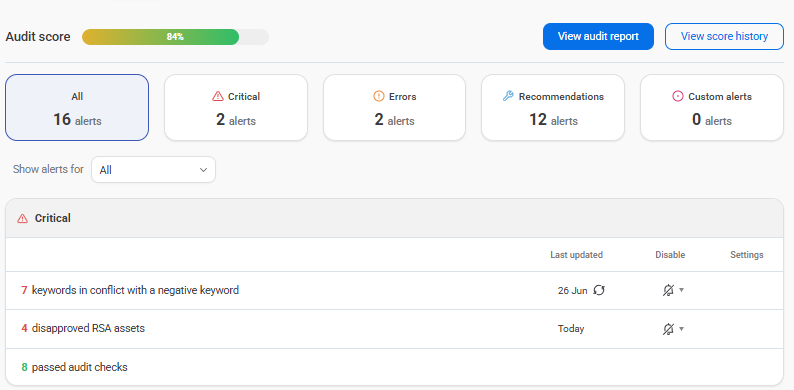
Adalysis audit alerts, prioritized as critical, errors, and recommendations.
Adalysis helps you audit PPC accounts faster and spot issues sooner. That means you can focus more of your time on strategy, testing, and client-ready recommendations.
Get your own audit report with a free 30-day trial. See what Adalysis can find in your account.
Share around the web





Scale your PPC performance,
not your workload.


Leave a comment