ChatGPT or Claude for Google Ads? Accuracy, speed, and chart problems
By Brad | 0 comments November 19, 2026
Categories
You want to connect an AI assistant to your Google Ads accounts via Adalysis MCP. Does it matter whether you use ChatGPT or Claude?
We tested both with live account data, from quick questions to full action plans and charts. Both returned accurate figures most of the time, including for custom date ranges.
Most of the differences we saw came down to two things. The first was how each assistant used the Adalysis data it could access. Claude made more use of Adalysis alerts, which helped it catch issues ChatGPT missed. The second was how we worded our prompts. When we didn’t spell things out, the two assistants picked different date ranges, and both drew charts that looked clear but gave the wrong impression.
Overall, Claude came out slightly ahead, due to better presentation. ChatGPT adds more outside context, which could suit less experienced managers. We also look at why Gemini is harder to use for this kind of work.
How ChatGPT and Claude connect to Adalysis
MCP (Model Context Protocol) lets AI assistants connect to external tools and data. With Adalysis MCP, you can ask assistants like ChatGPT or Claude questions about your live Google Ads data.
The assistant also gets Adalysis’s own analysis, including audits. So its answers draw on the same checks Adalysis runs on your account, not just raw numbers. This additional context improves the usefulness and reliability of the answers.
About the data
In the last two months, we ran roughly 100 prompts across about 200 Google Ads accounts. Some prompts looked at a single account. Others pulled together data from a franchise with around 90 accounts to test how each assistant handled data across many accounts at once.
Accuracy: Both assistants got the data right most of the time
Before comparing anything else, we checked whether the numbers were right. Our spot check usually matched the account data for both assistants, even for custom date ranges that Adalysis doesn’t store.
The exceptions included flipping formulas. For example, CPA = conversions/cost, rather than cost/conversions.
Switching the decimal symbol from dot to comma (or the other way around) can also wreak havoc. For example, a $100.00 budget written as $100,00 becomes a $10k budget instead.
So while the data is usually correct, you still need to check it, especially for budgets and bidding.
What each assistant assumes about date ranges
It’s best to always state the date range you want in your prompt or the assistant will pick for you. However, ChatGPT and Claude don’t always pick the same thing. They may also pull years of data that you don’t need.
For action plans, both assistants look at the data first. Then they choose a timeframe and explain why.
| What you ask for | Claude | ChatGPT |
| A chart with no timeframe (for example, clicks vs conversions) | 1 to 3 years | 1 year |
| A metric count (for example, how many conversions) | Current month | Current month |
| An action plan | Last 30 or 90 days, depending on how much data exists | Last 30 or 90 days, depending on how much data exists |
Speed: each assistant is slow at different things
Neither assistant was faster across the board.
| Task | Claude | ChatGPT |
| Full action plan | 1.5 minutes (average) | 3.2 minutes (average) |
| All-time conversions for an account | 37 seconds | 9 seconds |
| Quick question about an account | Usually under 15 seconds | Usually under 15 seconds |
Claude can be slower on short questions when it adds more context or splits the question into steps. When we asked for all-time conversions, it first went looking for the date the account started.
ChatGPT slows down when it has to pull together and summarize a lot of data, which is why its action plans took twice as long.
How each assistant builds an action plan
Claude groups by campaign type, ChatGPT by entity
Claude often organizes tasks by campaign type, such as Search, Performance Max, or Shopping. ChatGPT is more likely to organize tasks by Google Ads entity types: search terms, assets, ads, etc.
Neither approach is wrong — they’re just different. Claude is arguably closer to how most PPC managers work, whereas ChatGPT is closer to how Google Ads itself is structured.
For example, say you’re developing an action plan that covers negative keywords. Claude splits the task by campaign type, whereas ChatGPT treats it as one task across all campaigns. In this case, we prefer Claude’s groupings as it reflects how many PPC teams work.
Claude makes more use of Adalysis alerts
When building action plans, Claude drew on Adalysis alerts more often and caught issues that ChatGPT missed.
For example, Claude recommended re-enabling a disapproved ad alert. Some ad groups weren’t getting impressions because all the ads were disapproved. The advertiser had disabled this alert, so they weren’t catching that issue. ChatGPT’s plan for the same account didn’t mention it.
Claude is easier to scan; ChatGPT adds more context
Claude’s answers were much easier to read in every test. Its formatting makes it quick to scan the data and spot what matters.
ChatGPT brings in more outside context and adds more detail to each action item. This is good and bad, as it also makes its answers much longer for the same tasks.
For quick lookups, the pattern flips. Ask how many conversions an account has, and ChatGPT gives a short, direct answer. Claude adds more detail, such as conversions broken down by network.
Prettier charts aren’t always clearer charts
Claude’s charts look nicer by default, but they can be misleading.
The click spike in this chart doesn’t look huge, when, in fact, October had almost 25,000 clicks and January had only 5,000. You can’t easily tell because Claude drew an axis that jumped from 10 to 100 to 1,000 to 10,000.
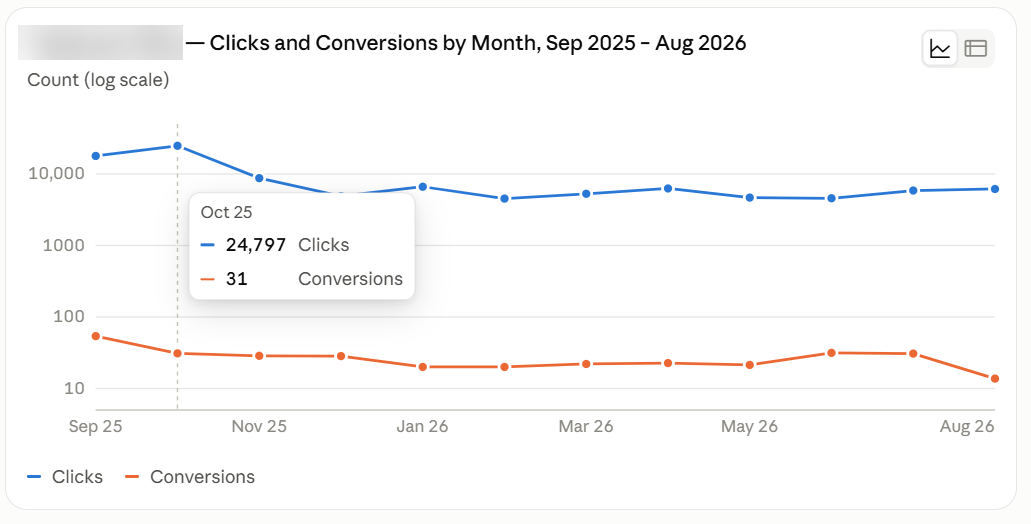
Both assistants drew poor charts like this, but Claude did it more often. ChatGPT was more likely to draw an accurate chart without detailed instructions.
The two assistants also use different technologies to draw charts, so each can show different things. To get a chart you can trust from either one:
- Name the chart type you want.
- Ask for a standard (linear) axis.
- Check the numbers behind the chart before you act.
What about Gemini?
Gemini is harder to use for this kind of work, for three reasons.
Connecting it is more difficult. Gemini doesn’t natively support third-party connectors. On a Google Workspace Enterprise account, you can get your IT team to enable them. On Workspace Pro or a standard Gemini subscription, you can’t add one, apart from six connectors Google has built itself, such as for Salesforce.
Its charts can be hard to read. In our testing, Gemini often drew charts, tables, and code in dark mode only, even though it can produce light mode versions. It switched back to light mode after a while, then lost it again. Around 25% of the world struggles to read in dark mode. Gemini can help you copy each chart or table into another tool to read it, but doing that every time is slow.
Gemini seems to over-index Google’s help files. Claude and ChatGPT used a mix of third-party references and Adalysis’s recommendations for ambiguous queries or to add context to recommendations. Gemini seems to rely a lot more on Google’s help files.
The difference showed in the advice. Claude and ChatGPT drew on Adalysis’s recommendations, which led to best-practice answers like adding top search terms as keywords. Gemini gave more generic Google Support answers, such as raising bids or budgets.
Wrap-up
Both assistants work. Both returned accurate data from live accounts most of the time. And either one can help you analyze an account and plan your next steps.
Claude came out slightly ahead in our tests. Its answers are easier to scan, it groups action plans the way PPC managers work, and it builds full action plans in half the time.
ChatGPT’s extra context could make it the better choice for less experienced managers who want more explanation with each action item. It also answered our all-time conversions question much faster.
Your results may also vary depending on which model and settings you use.
Whichever assistant you choose, a few habits will get you better answers:
- State the date range in every prompt.
- Name the chart type you want, and check the numbers behind it.
- Try the same prompts with both assistants on your own accounts. The best fit depends on how you work.
- Double-check the formulas and any bids or budgets before allowing your AI assistant to make changes to your account.
To see for yourself how Adalysis MCP improves AI answers, try it for 30 days for free.
Want more ideas on prompts you could use? Read about more ways to put your PPC data to work.
Share around the web




Scale your PPC performance,
not your workload.


Leave a comment