Categories
AI Max offers new targeting and creative options. If you’ve been hanging out on the conference circuit or LinkedIn, it sounds like everyone is testing it. Now that Dynamic Search Ad campaigns are migrating to AI Max, the volume is only increasing.
While AI Max is a campaign-level setting, you can disable it for any ad group. You need to analyze your AI Max data at both the campaign and ad group level to understand how well it’s performing for you.
The questions we’re hearing most often at Adalysis are whether it’s worth it and how to get started. So here’s what you should consider and what we’ve been doing to help you make the right decisions faster.
Broad match
AI Max treats all your keywords as broad match, even if you only have exact and phrase match versions. At the same time, reporting changes are making it harder to see what’s working.
There are five things to check before you get started:
- Accurate conversion tracking
If your data is off, AI Max will be too. - Automated bidding with a conversion-focused strategy
Broad match only works well with this type of bid strategy. Target strategies are more predictable than Max. - Conversion volume
Test AI Max in non-brand campaigns with at least 30 conversions per month. - No impression share lost due to budget
Losing impressions due to budget? AI Max will divert spend from your handpicked keywords. - Make sure broad match works well for your account
If broad match isn’t profitable, AI Max may waste budget.
The next step is to adapt your process for managing search terms.
Google needs to assign impressions, clicks, cost, etc, to your keywords each time they trigger an impression. If you don’t have a broad match keyword, then Google assigns the AI Max data to phrase or exact match in most cases. This creates two challenges:
- When your keywords have data from multiple match types, you can’t evaluate how each match type is performing.
- AI Max expanded matches may include traffic you were already receiving from your exact and phrase keywords.
It’s a good idea to add your exact and phrase match keywords as broad match, so you can see how each match type performs.
Read more: The hidden challenges of AI Max search term reporting
How Adalysis helps
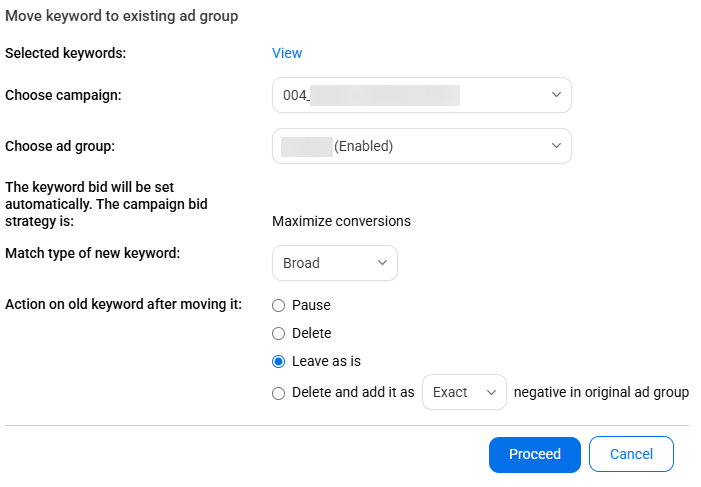
You can use the keyword management tool in Adalysis to quickly add your keywords as broad match. It also avoids creating duplicate keywords.
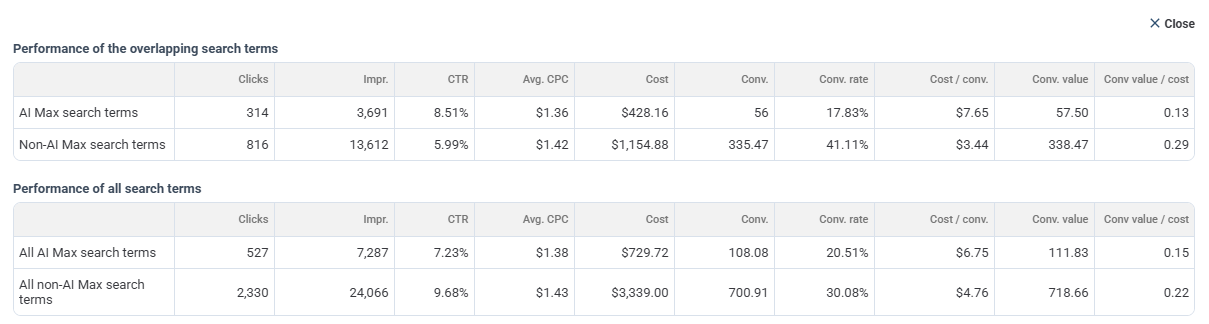
Adalysis brings together all the data you need to assess if AI Max is adding value to your campaigns. This includes overlap analysis between AI Max and Search. You can also create keywords and negatives directly from the same view.
AI Max n-grams make it much easier to analyze large numbers of search terms and get insights into your data. By breaking search terms into patterns of 1-5 words and reaggregating the performance data, you can spot trends you’d otherwise miss.
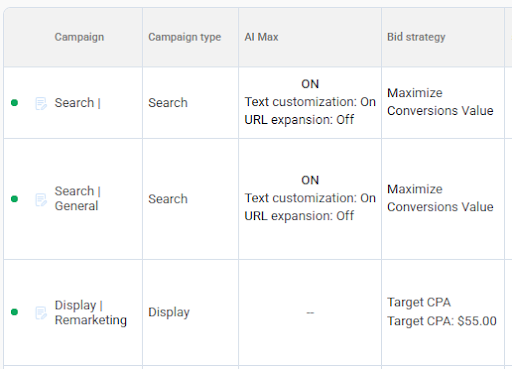
You can also see and update your AI Max settings across your account.
Auto-created content
AI Max also features text customization. Once enabled, Google automatically creates new RSA headlines and descriptions using your landing page (on-page text and metadata), ads, and assets.
To guide how Google’s AI writes your assets, you can define text guidelines. For example, you can ask it to use or avoid specific words or concepts, like pricing.
Read more: How to create effective AI Max text guidelines
You can’t just ‘set and forget’ text customization. Pruning unhelpful or inaccurate assets is crucial, as well as updating your guidelines. Watch out for:
- domain names without any other text
- promotions that don’t exist
- inaccurate pricing
- guarantees you don’t offer
- services that you don’t want to prioritize
- language that isn’t allowed in your industry for legal reasons
Auto-created assets don’t contribute towards the 15 headlines and 4 description lines for responsive search ads. However, it’s always worth considering the total number of combinations possible. A high volume of assets will make it harder to achieve statistical significance for your ad tests.
Here are three test cases for auto-created content in ecommerce and lead gen for B2B and B2C. Depending on your niche, they can help you decide whether to test this feature with your account.
How Adalysis helps
Adalysis records the source of all RSA assets: advertiser or automatically created. This means you can assess how Google’s auto-created assets are performing without exports.
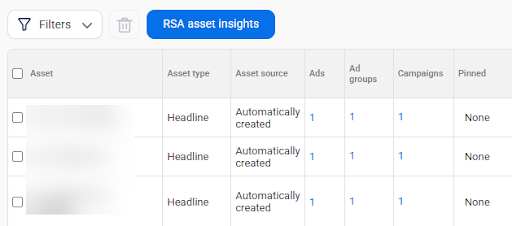
Filter your RSA assets by source for quicker comparisons. Save the filter as an alert to get a notification when your conditions are met. Or create a custom alert to monitor auto-created content as part of your daily audit.
URL expansion
AI Max includes URL expansion. This means Google can choose any page on your website as a landing page when AI Max triggers an ad.
When you turn on URL expansion, Google may ignore your pinned assets in favor of others they deem more relevant to the landing page being used.
You can turn it off in your Google Ads settings, or tell Google to exclude or include particular URLs. For example, you can exclude old content or pages without conversion tracking.
Some advertisers have found success using AI Max with blogs and support pages. However, these seem to be the exception rather than the norm. It’s usually better to limit your campaigns to conversion-focused landing pages.
Another common issue concerns accounts targeting different locations by campaign. When each campaign has its own landing pages, AI Max routinely mismatches campaigns with other locations.
For instance, California campaigns might send all their traffic to the Texas landing pages. In that case, you would need to exclude all landing pages that don’t match your campaign’s location.
If you turn on URL expansion, we’d recommend regularly reviewing the URLs Google selects.
How Adalysis helps
Adalysis filters and analyzes automatically selected URLs. That means you can compare their performance with the ones you chose yourself. Then, exclude underperforming URLs one at a time or in bulk to stop Google from using them again in the future.

Wrap-up
AI Max has only been out of beta since April 2026. It shows some promise, particularly for the heavy lifting of ad copy creation at scale.
However, deciding whether to use AI Max in your account isn’t black and white.
Start by making sure you have the data foundation for this new optimization layer to work well. If broad match doesn’t work well for your Search campaigns, then AI Max isn’t likely to boost performance.
Then run a limited test with a few non-brand, high-conversion ad groups. Watch search terms, auto-created content, and URL expansion closely. If these features aren’t useful for your account, then AI Max probably isn’t the right choice.
A free 30-day trial of Adalysis lets you run this evaluation on your own campaigns, not just take our word for it.
Share around the web




Scale your PPC performance,
not your workload.


Leave a comment