Why your campaigns are underspending (and how to fix them)
By Brad | 0 comments September 1, 2026
Categories
Why isn’t my campaign spending its available budget?
This is one of the most common budget questions we get. Increasing the budget won’t help if targeting, settings, ad rank, or campaign structure are limiting delivery.
In this article, we’ll go through the most likely causes of underspending and the changes you can make to reach more of the right audience.
The budget is too high for your targeting
If you already have a healthy impression share, there may not be many more impressions available. That means you can’t spend more without expanding your targeting or removing restrictions limiting your reach.
Expand your targeting
The options depend on the campaign type:
- Add new keywords for Search campaigns
- Add new audiences for Demand Gen
- Add asset groups with new targeting for PMax
If you have mainly exact and phrase match, try broad match for your top keywords. If you’re already using broad match, then try AI Max for even more keyword expansion.
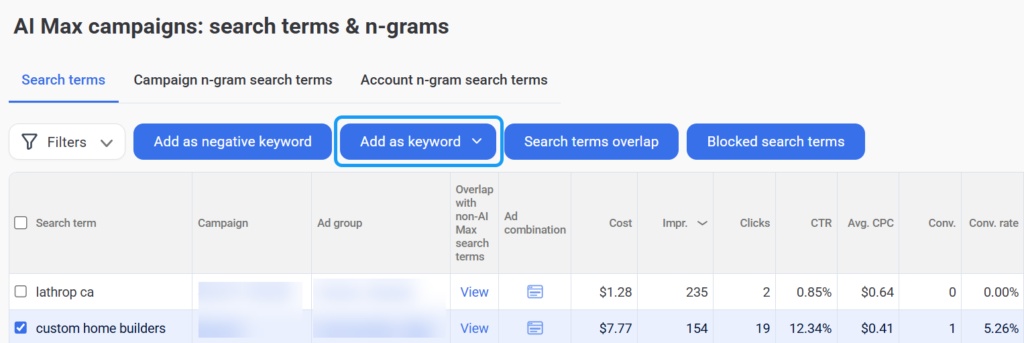
And if you’re using AI Max, evaluate its search terms and add the best-performing ones as keywords. This ensures your ads consistently show for them.
Review your restrictions
Restrictions can block impressions in two places: your keywords and your audiences.
Check that your negative keywords aren’t blocking anything essential. If your impressions are significantly different from Google’s Keyword Planner, this is often the cause.
Review any negative audiences, too. Removing unnecessary exclusions can increase your impressions.
Your campaign settings are limiting reach
Several campaign settings can restrict when and where your ads appear:
- Ad schedule: Check whether your ad schedule is restricting the times your ads can run
- Audience settings: When an audience is set to targeting, only audience members can see the ad. This is common for Demand Gen. However, for Search, someone must search for your keywords and be in your audience
- Demographics: Check if you’ve excluded users by income, gender, age, or other demographics. Removing exclusions will increase your reach
- Locations: Review whether you’ve blocked any important locations. Expanding your location targeting can increase your impressions
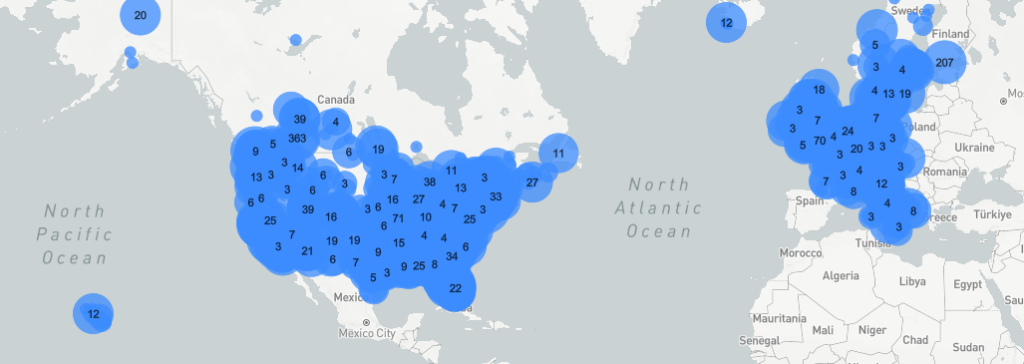
You can target people in your chosen locations and people elsewhere who show an interest in those locations.
We often see the ‘interest in’ option disabled. However, the conversions and conversion rates for this segment have increased significantly over the past few years. This applies especially if you’re also blocking countries, territories, or states that have historically underperformed.
Your ad rank is too low
Ad rank is a score Google uses to decide whether your ad is eligible for an auction. Your quality scores and bids are a big part of your rank, so changes in these areas can mean your ads show up more often.
There’s a lot more to quality score than we can cover here — our guide dives deeper.
Read more: How to boost your quality score
Improve your CTR through ad testing
Expected CTR is one of three quality score sub-factors, so improving your click-through rate through ad testing can lift your ad rank, too.
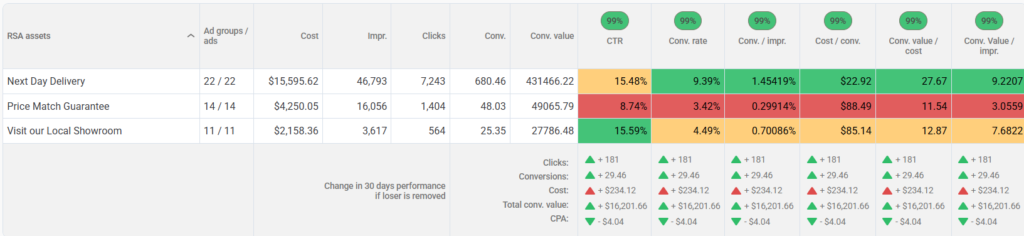
Conversions per impression can help increase both your click-through rate and total conversions. Consider using it as the test metric that helps you decide which ad has won the test.
Adalysis automatically tests your ads whenever an ad group has two or more, and alerts you when there’s a statistically significant winner. You’ll also see a projection of what your results would have looked like if the losing ad hadn’t run over the last 30 days.
Review your portfolio bid cap
If you use portfolio bidding, have you set a max bid cap? Caps help prevent very expensive clicks. But if they’re set too low, they can make you ineligible for some auctions.
Increasing the maximum bid cap can help your campaigns enter more auctions and spend more of their available budget.
Your account structure is holding you back
If your campaign is very new, its lack of history can be a challenge for Google. Start by looking at your bid strategy and consider how much data it needs to work effectively. For example, if you’re on Target CPA, a switch to a less data-dependent strategy can help.
Read more: What’s the most popular Google Ads bid strategy?
Structural issues are another reason campaigns underspend. The Adalysis audit checks for over 100 issues, like ad groups with no keywords or ads, conflicts between keywords and negatives, and disapprovals.
Your PMax campaigns may also be competing with Search campaigns for traffic. PMax can steal your top impressions, causing Search traffic and spend to decline.
Our study shows that Search outperforms PMax for CTR, conversion rates, and values. The solution is to monitor your search terms and add top performers as exact match keywords. This simple step will help you prioritize Search campaigns over PMax campaigns.
Read more: Is Performance Max cannibalizing your Search ads?
Wrap-up
“How can I spend more?” sounds like a simple question, but it can have many answers. The cause might be your targeting, settings, ad rank, or account structure. And sometimes it’s a mix of all four.
Before you raise your PPC budget again, check each of these:
- Targeting
Is your impression share already high, or are restrictions limiting your reach? - Campaign settings
Are your schedule, audience, demographic, or location settings blocking impressions? - Ad rank
Are low quality scores or bid caps keeping you out of auctions? - Account structure
Is a new campaign still building history, or is PMax competing with Search for your traffic?
As you increase your reach and budget, check that you’re still receiving your desired results. Spending more for the sake of spending more won’t help you in the long run.
If you expand your targeting with new audiences, AI Max, or by removing restrictions, you must monitor the new impressions to ensure they’re improving your account and not wasting spend.
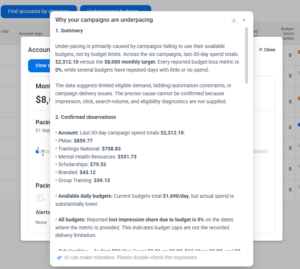
With Adalysis, you can get AI summaries of the most likely causes of underspending for your campaigns, and our full suite of budget management tools. Get a free 30-day trial to see how it works with your own data.
Share around the web



Scale your PPC performance,
not your workload.


Leave a comment